

Enterprise-grade by architecture
grommunio scales from a single server to clustered, highly-available deployments behind your load balancer — without ever giving up the protocols and clients your organization already depends on.
- 100,000+
- Users per deployment
- Active/active
- High availability
- MAPI/HTTP
- Native Outlook
- OIDC · SAML
- Modern single sign-on
Built to scale out
A Linux-native, service-oriented core engineered for density and growth — add capacity by adding nodes.
Cluster-ready
Run grommunio across multiple nodes. Stateless application services scale out horizontally — more nodes simply means more capacity.
Load-balancer friendly
Put any standard L4/L7 load balancer in front. Sessions aren't pinned to a single node, so traffic distributes cleanly with no sticky-session gymnastics.
Highly available
Active/active and active/passive topologies, health checks and automatic failover keep mailboxes online through node loss and maintenance.
Scalable data tier
A MariaDB/Galera-backed metadata layer and a scalable message store you can replicate and cluster independently of the application tier.
Modular by design
MTA, store, web and sync are independent services — scale, isolate, monitor and update each one on its own.
Linux-native performance
A lightweight C/C++ core (gromox) built for efficiency — thousands of mailboxes per node, without the overhead.
Layered, separable, scalable
Every layer of the stack is an independently scalable service — add capacity where it counts. The grommunio components ride on standard, well-known Linux infrastructure.
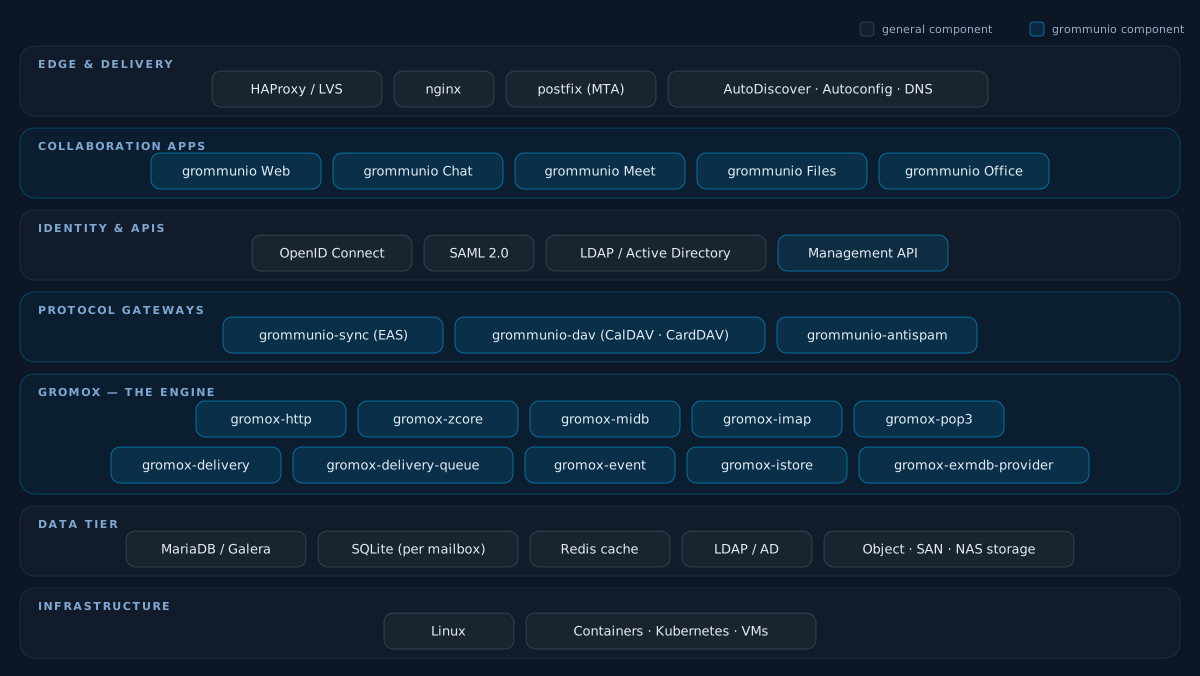
Real HA, the way operations teams build it
Beyond load balancing — grommunio runs on the proven Linux high-availability stack for genuine fault tolerance, not just redundancy on paper.
- Corosync & Pacemaker Build true high-availability clusters on the established Linux HA stack — Corosync for cluster messaging and membership, Pacemaker for resource management and orchestration.
- Automatic failover & fencing Resources relocate automatically when a node fails, with STONITH/fencing for split-brain protection and data integrity.
- Replicated & shared storage Pair with DRBD, shared SAN/NAS or a clustered database tier so no single node is a point of failure.
- Active/active or active/passive Choose the topology that matches your SLA — scale-out throughput or a warm standby ready to take over.
- Rolling maintenance, zero downtime Patch and upgrade one node at a time while the cluster keeps serving users.
- Geo-redundancy Stretch clusters or replicate across sites and data centers for disaster recovery.
Cloud-native by design
grommunio embraces cloud-native principles, so it deploys, scales and heals the same way modern infrastructure does.
- Container-ready Official container images run on Docker, Podman and Kubernetes — orchestrate grommunio like any other cloud-native workload.
- Stateless services Application components keep no local state, so they scale out (and back in) horizontally and recover instantly.
- Replicated or shared storage Cluster the way that fits your infrastructure — give each node its own replicated storage, or run all nodes on common SAN/NAS storage. grommunio supports both equally.
- Scale on demand Add or remove replicas to match load, with rolling deployments and your orchestrator’s autoscaling.
- Declarative & automatable Configuration-as-code and a management API make deployments reproducible and CI/CD-friendly.
- Runs anywhere The same artifacts run on-premises, in your private cloud, in public cloud, or in a sovereign environment — no lock-in.
Every protocol, no compromise
grommunio speaks the same protocols as Microsoft Exchange, so your existing clients connect natively — nothing to install, nothing to migrate away from.
- MAPI/HTTP — native Outlook Outlook for Windows connects natively over MAPI/HTTP (and RPC/HTTP), exactly as it would to Exchange. No plugins, no connectors, no middleware.
- Exchange Web Services (EWS) Rich interoperability for clients and integrations that speak EWS, including eM Client, Outlook for Mac and macOS Mail.
- Offline Address Book (OAB) The global address list is published as an Offline Address Book, so Outlook can cache it for fast, offline address lookups.
- Exchange ActiveSync (EAS) Native push email, calendar and contacts on iOS, Android and Outlook mobile.
- IMAP, POP3 & SMTP Open standards for any mail client or downstream system you need to connect.
- CalDAV & CardDAV Standards-based calendar and contact synchronization across every platform.
- Autodiscover & Autoconfig Clients configure themselves — users just enter their email address and they're connected.
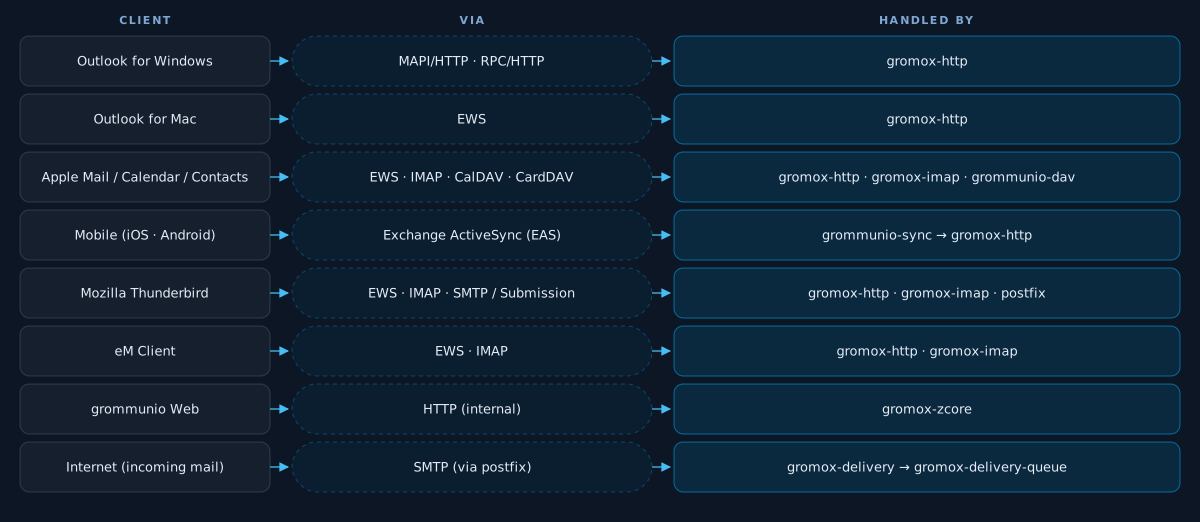
From client to mailbox
Each row is a single, uncrossed lane: a client family, the protocol it speaks, and the gromox service that answers — the same path Outlook uses against Microsoft Exchange.
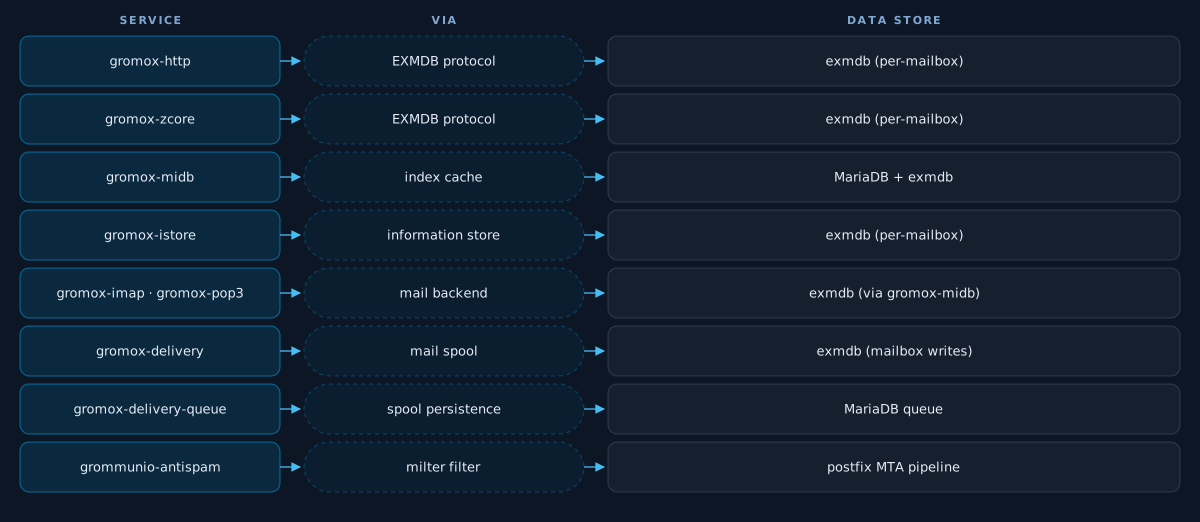
Where each service lands
Once a request is inside gromox, each service reaches its data store via a defined interface — per-mailbox exmdb, MariaDB metadata, Redis cache, or the postfix-fronted mail spool.
Use the email client you already love
Your users keep the client they know. Because grommunio speaks the standard protocols, virtually every modern mail and groupware client connects natively — on desktop, mobile and the web.
Authentication that fits your environment
Plug grommunio into the identity stack you already run — federate sign-in, enforce policy and delegate administration.
OpenID Connect (OIDC)
Federate authentication with your identity provider — Keycloak, Microsoft Entra ID, Okta and any OIDC-compliant IdP.
SAML 2.0
Single sign-on against enterprise SAML identity providers, with seamless session federation.
LDAP & Active Directory
Authenticate and provision users straight from your existing directory service.
MFA & conditional access
Built-in TOTP plus full WebAuthn / FIDO2 and conditional access through your IdP — keep sign-in policy in one place.
Role-based administration
Granular, delegated administrative roles — per organization and per tenant.
Secure by default
TLS everywhere, modern ciphers and S/MIME for end-to-end message security.
Hardened at every layer
Security is foundational to grommunio, not an afterthought. A strong track record, fully transparent open-source code and a deep set of security principles keep your communication protected.
Secure by default
TLS everywhere, modern ciphers and hardened defaults out of the box — no insecure legacy modes.
Defense in depth
Independent, layered controls across transport, application, storage and identity.
Least privilege
Granular RBAC and delegated administration — every user and admin gets only what they need.
End-to-end encryption
S/MIME signing and encryption for message authenticity, integrity and confidentiality.
Spam & malware defense
grommunio-antispam (powered by Rspamd) and ClamAV screen every message with rule-based, statistical and signature analysis.
Continuous hardening
Rapid security updates, coordinated CVE response and a responsible-disclosure process.
Transparent & auditable
100% open source — the code is there for anyone to inspect, audit and verify. No black boxes.
Sovereign & compliant
Run on infrastructure you control, in your jurisdiction — GDPR-aligned by design.
Strong authentication
MFA together with OIDC and SAML enforce modern, federated, policy-driven access.
Multi-tenant and built for IT teams
Run one platform for many organizations, with the deployment options and tooling that operations teams expect.
- True multi-tenancy Host many isolated organizations on a single platform — each with its own domains, users, policies and administration.
- Flexible, sovereign deployment On-premises, in your private cloud, or as a sovereign hosted service. Your data stays in your jurisdiction, under your control.
- Appliance, software packages or containers Deploy the turnkey ISO appliance, native packages for major Linux distributions, or container images for your orchestrator.
- Backup & disaster recovery Consistent backup and restore paths across the metadata and message tiers.
- Monitoring & observability Health endpoints, metrics and structured logs that drop straight into your existing monitoring stack.
- Long-term maintenance Security updates and predictable, professionally-supported release cycles.
- Declarative configuration Manage the platform from version-controlled state — file-based config, an open Admin API and community Ansible / Salt playbooks fit straight into your existing automation.
- Zero-touch client provisioning Outlook Autodiscover, Mozilla autoconfig, Exchange ActiveSync Autodiscover and Apple .mobileconfig — every mainstream client configures itself from just an email address.
Fits into the infrastructure you already run
Because grommunio speaks open, standard protocols, it slots into the estate around it — the archiving, mail security, backup and virtualization you already operate on the server side, and the Outlook add-ins your users rely on.
Mail archiving
Pair grommunio with compliance archivers such as MailStore over standard IMAP and journaling — your retention and e-discovery workflows carry on unchanged.
Mail gateways
Front it with a mail security gateway or appliance — such as Cisco IronPort or Proxmox Mail Gateway — for inbound and outbound filtering, routing and DLP.
Server-side backup
Protect the message store and database with the backup tooling you already run — snapshot, agent-based or storage-level, with no proprietary format required.
Any hypervisor
Runs as a standard Linux guest on every major hypervisor — VMware, QEMU/KVM, Xen (XCP-ng) and Microsoft Hyper-V among them.
Containers
Deploy in containers with Docker or LXC/LXD for lightweight, reproducible rollouts alongside the rest of your platform.
Outlook add-ins
Add-ins built on the standard MAPI/HTTP or EWS interfaces keep working — including email signature and disclaimer managers and similar server-side plugins.
Built on the technology that runs the internet
grommunio doesn't reinvent the wheel. It's built on the most trusted, battle-tested open-source technology in the world — the same components that run the internet.
We implement the standards. Then we improve them.
grommunio implements the full Microsoft Exchange protocol stack — 61 published Microsoft Open Specification documents from MAPI/HTTP and RPC over HTTP to Exchange ActiveSync, EWS and the long tail of MS-OX* properties. Where the documentation falls short our findings have been merged into Microsoft's own published spec, and where the protocol itself stops short we extend it.
- 61 Microsoft protocol specs, end to end From MS-OXCMAPIHTTP and MS-OXCROPS to MS-OXNSPI, MS-ASCMD, the MS-OXWS* web-services family and the MS-OXO* property objects — grommunio speaks the same wire protocols as Exchange Server itself, so Outlook on Windows connects with no client connector.
- 15+ corrections merged into Microsoft’s official spec From PT_LONG signedness to MAPI_HARD_DELETE semantics and missing MS-OXPROPS sizes — our review has produced fifteen pull requests that Microsoft accepted into its own Open Specifications, plus two further filed issues. Every contribution is traceable on GitHub.
- EAS impersonation — beyond what Microsoft’s own EAS does We extended Exchange ActiveSync and Autodiscover so a permitted user can reach shared mailboxes from their phone via impersonation. Microsoft’s own documentation explicitly states EAS does not support shared mailboxes or delegate access — grommunio does, with no client change.
- Multi-LDAP in one install — the world’s first in groupware Attach any number of independent directories — Active Directory, OpenLDAP, eDirectory, any LDAPv3 — to a single grommunio installation, per organisation. Microsoft Exchange is single-forest by design; grommunio isn’t.
No black boxes
grommunio is 100% open source, engineered in Europe and built on open standards from the protocol layer to the storage engine. Its high-performance core, gromox, implements the Exchange protocol surface natively on Linux — so there's no proprietary connector to license, no black box to trust, and no vendor lock-in.
Because every layer is open and standards-based, you can audit it, integrate with it, automate it, and run it wherever your compliance requirements demand — on hardware you own, in a cloud you choose, or in a sovereign environment you operate yourself.
Technology — frequently asked questions
Can I run grommunio in a high-availability cluster?
Yes. grommunio is designed for clustered, highly-available deployments — active/active or active/passive — behind standard load balancers, with health checks and automatic failover. Stateless application services scale out horizontally across nodes.
Does Outlook work without plugins or connectors?
Yes. Outlook for Windows connects natively over MAPI/HTTP (and RPC/HTTP), exactly as it connects to Microsoft Exchange — there is nothing to install on the client and no middleware in between.
Which identity providers and SSO standards are supported?
grommunio supports OpenID Connect (OIDC) and SAML 2.0 for single sign-on with providers such as Keycloak, Microsoft Entra ID and Okta, as well as LDAP and Active Directory for authentication and provisioning.
Can one installation host multiple organizations?
Yes. grommunio offers out-of-the-box multi-tenancy for it's core features (email, calender, contacts, tasks and notes) — many isolated organizations on a single platform, each with its own domains, users, policies and delegated administration.
Where can grommunio be deployed?
On-premises, in your private cloud, or as a sovereign hosted service. It ships as a turnkey ISO appliance, as native packages for major Linux distributions, and as container images.
Which Linux distributions are supported?
openSUSE / SUSE Linux Enterprise, Debian, Ubuntu, Red Hat Enterprise Linux and the RHEL-compatible family (Rocky Linux, AlmaLinux).
How is incoming mail accepted — does grommunio replace postfix?
No. grommunio works alongside postfix: postfix is the SMTP MTA at the edge (with grommunio-antispam as a milter), and it hands accepted messages off to gromox-delivery and gromox-delivery-queue for per-mailbox delivery. Postfix configuration stays familiar to operators.
Are mailbox sizes limited?
There is no hard product-side cap on individual mailbox size — each mailbox is its own SQLite-backed exmdb store, scalable into the hundreds of GB, and per-user quotas can be configured via the admin UI or API. Important caveat on the client side: Microsoft Outlook does not cope well with very large mailboxes — beyond roughly 100 GB its local cache becomes slow and prone to corruption. We recommend keeping mailboxes used with Outlook under ~100 GB; for anything larger, use Outlook in online mode, grommunio Web or another client instead.
How is backup handled?
Per-mailbox exmdb files plus the MariaDB metadata database can be backed up using standard tooling (file-level snapshots for exmdb, mariabackup or logical dumps for MariaDB). The admin documentation covers consistent point-in-time backup and restore procedures.